GPS Location Flow & Tracker
- 4.0
- Rating
- 100.00K
- Installs
- Free
- Price

 Analysis by App-foxy
GPS Location Flow & Tracker is the kind of Android navigation app I would examine carefully before asking my family or friends to depend on it. Its purpose is straightforward: it is designed to help you view a live location, share that location with people you know, and create alerts around an area. That combination can be useful in ordinary life, but it also touches one of the most sensitive types of personal information, so convenience is only half of the decision.
I spent my time looking at the app as a practical location-sharing tool rather than treating it like a full replacement for a traditional map service. The experience makes the most sense when the people involved want a focused way to coordinate or check in. It is less convincing if you expect detailed route planning, a large place directory, public transit guidance, or the mature ecosystem that comes with the biggest mapping platforms.
The app is free, is listed for Everyone, and comes from Karyaku Dev. It belongs to the Maps & Navigation category, although its emphasis is clearly on people and areas rather than on turn-by-turn travel. The current release is version 1.1.0.0, and it requires Android 9 or later. Those details make it accessible to many Android users, but they do not by themselves answer the most important question: whether its location controls fit the level of trust you need.
You May Also Like

 Blood Strike: 2.5 Anniversary
Blood Strike’s Loadouts Turn Every Drop Into a Tactical Gamble
A close look at Blood Strike’s custom loadouts: how fast access to signature weapons reshapes its battle royale rhythm, rewards preparation, and narrows the gap between fights.

 Pandora - Music & Podcasts
Pandora’s Music Is Easy to Start, but Harder to Recover
Pandora’s strength is its low-effort path from a seed to a station. Its weak spot is how much confidence it asks you to place in connection, setup, and quiet recovery.

 8 Ball Pool
 Is Built on Rivalries, Rematches, and Routine
A close look at the rivalries, rematches, shared routines, and unanswered safety questions that turn a quick pool match into a persistent mobile community.

 Samsung Music
’s Quiet Strength Is Playing What You Already Own
Its reach comes less from spectacle than from dependable access to a personal library. That simplicity is both the app’s strongest retention engine and its ceiling.

 AccuWeather: Weather Radar
AccuWeather Review: A Quick, Clear Forecast for Everyday Decisions
For everyday plans, the best forecast is the one you can understand quickly. AccuWeather makes rain timing, radar, and local conditions easy to act on, with a few trade-offs.

 Hill Climb Racing
Why Hill Climb Racing Still Turns Crashes Into One More Run
A tiny car, a bumpy hill and one more upgrade: Hill Climb Racing keeps resurfacing because its simple chaos makes every near-miss feel personal.
More From Our News Desk



How GPS Location Flow & Tracker handles trust and control
Location sharing creates a different responsibility from simply looking up a street. A map search usually concerns a place; a tracker concerns a person’s movements. I therefore judge this app less by how quickly it opens a map and more by whether its choices are understandable at the moment I need to make them. The useful test is simple: can I tell who may see a location, why an alert exists, and when I should stop sharing?
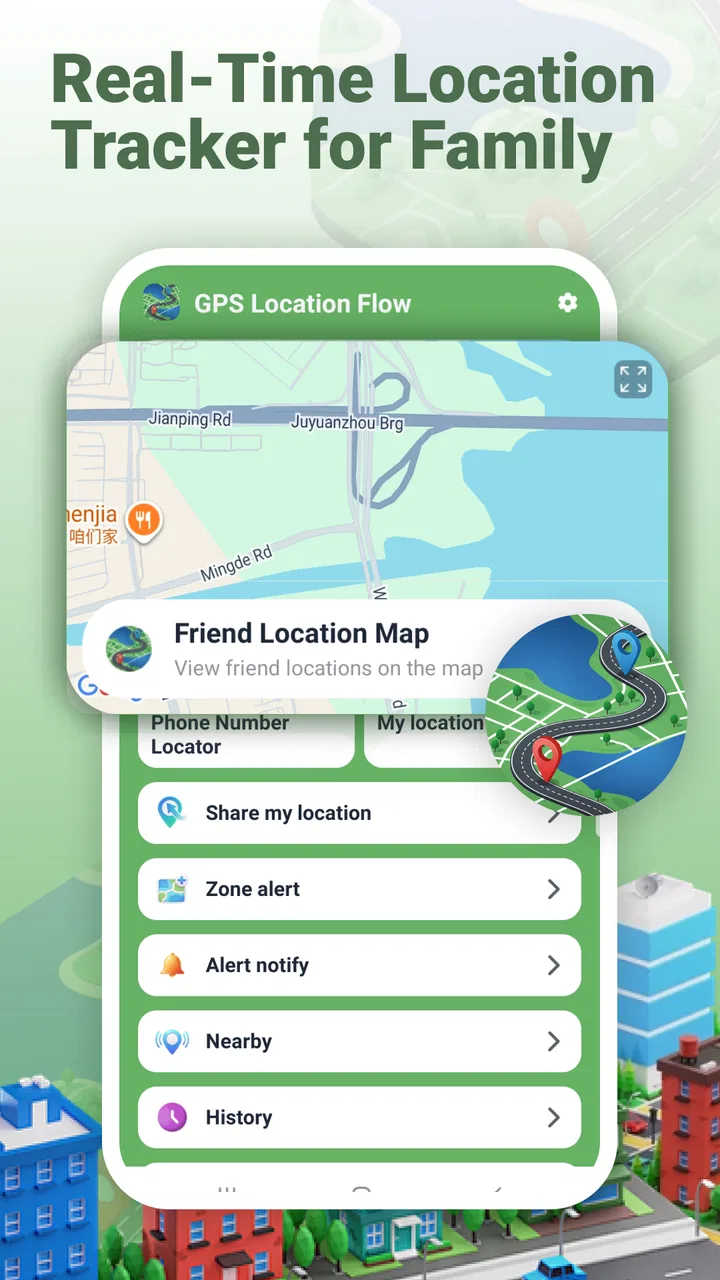
The store summary presents three central jobs: viewing real-time location, sharing with friends, and setting area alerts for family. I would keep those jobs separate in my mind. A live location view is an immediate check. Sharing is an ongoing relationship between people. An area alert adds an automated condition that may continue to matter after I have stopped actively looking at the screen. Treating all three as the same feature can lead to careless setup.
Before using it with someone else, I would agree on a small set of rules outside the app. We would decide whether sharing is only for a journey, a school pickup, a visit, or a longer family arrangement. I would also agree on what an alert means and what it does not mean. An area alert can support coordination, but it should not become a substitute for a phone call in an emergency or a reason to monitor someone without their clear knowledge.
One practical strength of this focused approach is that it can reduce the number of tools involved in a simple check-in routine. If a parent wants to know when a family member reaches a familiar place, or friends want to coordinate a meeting without repeatedly sending messages, a location-centered app may feel more direct than combining a general map, chat thread, and calendar reminder. The trade-off is that every participant has to understand the sharing arrangement instead of assuming the app will make the decision for them.
What I would verify before sharing a location
I would begin with the Android permission prompts and read each one rather than tapping through automatically. Location access is the key permission for this kind of app, but the exact choice offered by Android matters. If the phone presents options such as approximate or precise access, I would choose the least precise setting that still supports the intended task. If background access is requested, I would consider whether an area alert genuinely needs it and whether I am comfortable with that behavior.
I would also check the system-level permission screen after setup. That gives me a second chance to review whether access is allowed only while the app is in use or under a broader setting. I would not assume that a friendly interface means the operating system permission is equally limited. The operating system controls are the most concrete place to confirm what the app can request from the phone.
The next check would be the people and areas I have configured. I would look for clear names and remove old entries instead of allowing a list to grow indefinitely. A useful habit is to label an area by its purpose, such as “pickup point” or “home,” rather than using vague names that could be misunderstood later. I would do the same with contacts or friends: only add someone who knows why the connection exists.
The safest workflow is to create the smallest sharing arrangement that solves the immediate problem, then review it when the situation ends. For a one-time trip, I would avoid creating a permanent family pattern if a temporary check-in is enough. For a recurring arrangement, I would periodically confirm that everyone still wants it. This is a more reliable privacy habit than assuming an old setting remains appropriate forever.
Real-life situations where the app makes sense
Imagine that I am meeting two friends at a busy outdoor event. Instead of sending several messages asking where everyone is, we could use the live-location function to coordinate the final approach. I would share only with the people involved, use it while traveling to the meeting point, and then remove or end the arrangement once we are together. In this scenario, the app’s value comes from reducing confusion, not from watching someone throughout the day.
A family use case is slightly different. Suppose a teenager is returning from an activity and the household wants a simple arrival signal. An area alert could be useful if everyone understands which place it refers to, what event triggers it, and who receives the notification. I would explain the setup to the teenager rather than presenting it as invisible supervision. That conversation is important because the technical control and the human agreement are not the same thing.
Another reasonable use is coordinating care for a relative who has agreed to share location during a specific routine. Here I would be especially careful about false reassurance. A location shown on a screen does not prove that a person is safe, has seen a message, or can respond. I would pair the app with a normal contact plan and make sure everyone knows which situations require direct communication.
For a group outing, the area-alert idea can also be used in reverse: instead of asking people to report every movement, the group can agree on a meeting zone and use the alert as a reminder that someone has arrived or left it. The useful insight is to define the area around a decision, not around surveillance. “Tell us when you reach the venue” is a clearer purpose than “keep watching where you go.”
Where it differs from ordinary map apps
My usual map application is better when I need directions, traffic context, business information, route alternatives, or a broad view of a journey. GPS Location Flow & Tracker is more specialized. Its appeal is the relationship layer: people sharing a current position and family members using an area-based notification. If your main question is “How do I get there?” I would choose a conventional navigation service. If your question is “Has my agreed contact reached the agreed place?” this app is closer to the problem.
Messaging apps can sometimes handle location sharing too, and they may already be installed by everyone in a group. Their advantage is that location and conversation stay together. A dedicated tracker can be easier to understand when the main task is repeated checking or area-based coordination, but it also introduces another app that each participant must install, permit, and remember to manage.
That comparison leads to a useful trade-off. A general map service usually offers more mature travel information, while a chat application may offer stronger social context. This app is worth considering when you want a narrower tool built around live location and alerts. It is not the obvious choice for someone who wants one application to cover navigation, discovery, messaging, and location sharing at once.
Data-sensitive moments deserve extra care
The most sensitive moment is not necessarily the first map view. It is the point at which a location becomes visible to another person or becomes part of an automated alert. I would pause there and confirm the recipient, the purpose, and the expected duration. A mistaken contact or an old area setting can create more trouble than a slow map screen.
I would also avoid using a shared device or an unlocked phone for setup. Location tools can expose relationship details even when the map itself is not open: who is connected, which places matter, and when alerts are expected. On a personal phone, I would use the device’s normal screen lock and review notifications so that sensitive location details are not unnecessarily displayed on the lock screen.
Battery and connectivity are practical parts of trust as well. A live location is only useful when the phone can determine and transmit its position, and a low battery or weak connection can interrupt that chain. I would never promise another person that the app guarantees continuous visibility. Instead, I would treat it as one signal and keep a backup plan for important journeys.
There is also a difference between an area alert and an exact arrival confirmation. If the boundary is broad, the notification may not match the moment a person reaches a particular door. If it is narrow, normal positioning variation may make the result less predictable. I would choose an area large enough to represent the real-life place and test the arrangement together before relying on it for a time-sensitive pickup.
For children, older relatives, or anyone in a vulnerable situation, I would be even more conservative. Consent should be understandable, and the person should know who can see the information. I would not use a tracking arrangement to replace supervision, medical support, or emergency services. The app can help with coordination, but responsibility remains with the people using it.
Questions I would answer before installing
If you are wondering whether it works on an older Android phone, the practical cutoff is Android 9. A compatible operating system is only the first step, though; the phone must also have location services available and the relevant permissions enabled. I would install it on the device that will actually be carried during the activity, because a second phone left at home can make a location-sharing plan meaningless.
If you are asking whether it is suitable for iPhone users, the product information I reviewed identifies this release as an Android app and gives an Android minimum requirement. I would therefore plan around Android participants rather than assume that an iPhone user can join the same setup. For a mixed-device family, I would first confirm platform compatibility before asking everyone to reorganize their routine around it.
If you want to know whether it replaces a navigation app, my answer is no. I would use it alongside a normal map when I need routes or travel planning. Its role is narrower: seeing a current position, sharing with selected people, and organizing area-based family alerts. That specialization is useful, but only when your actual need matches it.
If you are concerned about control, I would start with Android’s permission manager and then inspect the app’s own sharing and alert settings. I would remove connections and areas that no longer serve a clear purpose, and I would avoid granting broader access simply because setup feels faster. The visible choices matter more than assumptions about what a location app “probably” does.
If you are deciding whether the free price makes it worth trying, I think it does for a limited, low-risk test with people who understand the arrangement. I would not begin with a sensitive family routine or depend on it for safety-critical monitoring. Start with a short meetup, check how the live view and alert behavior fit your expectations, and then decide whether the convenience justifies continued use.
Who should use it, and who should skip it
I can recommend trying GPS Location Flow & Tracker if you want a focused way to coordinate with friends or family and you are willing to manage permissions deliberately. It may suit households that need arrival-oriented alerts, friends organizing a meeting, or small groups that want location sharing without turning a general navigation app into their main communication tool.
I would steer away from it if you need professional fleet management, detailed travel records, emergency-grade reliability, or a complete navigation platform. I would also skip it if the people involved are uncomfortable with location sharing or are unlikely to review access after a trip. A technically useful feature becomes a poor choice when the social agreement around it is weak.
The app’s public rating currently sits at zero, while its presence has reached over ten thousand installs. I would read that combination cautiously rather than treating either figure as a verdict. It suggests that there is some interest, but it does not give me a strong basis for judging long-term reliability or community experience. I would test it personally and keep expectations proportional to the app’s focused role.
My cautious verdict after looking at the whole experience
What I like about GPS Location Flow & Tracker is its clear practical direction. Live location, friend sharing, and family area alerts address real coordination problems, and the free entry point makes a small trial easy. The developer, Karyaku Dev, has positioned it as a focused Maps & Navigation app rather than an overloaded all-purpose platform, which may appeal to people who want one specific job handled simply.
What keeps me cautious is the sensitivity of the information involved and the limited evidence available from a zero average rating. I would not install it and immediately give it broad, ongoing access. I would begin with a short scenario, use the narrowest Android permission that supports the task, name only the necessary contacts and areas, and clean up the arrangement afterward.
My final recommendation is conditional but positive: try it when your need is deliberate location coordination, not general navigation or invisible monitoring. Its real value depends on user agency: everyone should know what is shared, with whom, and for how long. Used that way, it can be a convenient family and friend tool. Used casually, it risks turning a simple feature into a long-running privacy decision.
FAQs for GPS Location Flow & Tracker
01How accurate is GPS Location Flow & Tracker in real-time tracking?
GPS Location Flow & Tracker offers highly accurate real-time tracking by leveraging advanced GPS technology. It provides precise location updates with minimal delay, ensuring users can trust the app for navigation or monitoring purposes. Factors like signal strength and environmental conditions might slightly affect accuracy, but overall, it maintains a reliable performance.
02Does GPS Location Flow & Tracker consume a lot of battery power?
GPS Location Flow & Tracker is designed to be efficient, but using GPS services can naturally consume more battery than usual. The app includes power-saving features and settings to minimize battery drain. Users can manage these settings to balance between tracking accuracy and battery consumption based on their needs.
03Can I use GPS Location Flow & Tracker offline?
GPS Location Flow & Tracker requires an active internet connection for full functionality, including real-time updates and map views. However, users can download maps for offline use in areas with limited connectivity. While offline, some features may be restricted, but basic location tracking remains operational.
04Is my data secure with GPS Location Flow & Tracker?
Yes, GPS Location Flow & Tracker prioritizes user data security. It employs encryption protocols to protect personal and location data. Users have control over their data sharing settings, and the app complies with data protection regulations to ensure privacy is maintained at all times.
05What devices are compatible with GPS Location Flow & Tracker?
GPS Location Flow & Tracker is compatible with both Android and iOS devices. It supports a wide range of smartphones and tablets running on recent operating systems. Users should ensure their devices meet the minimum OS requirements specified for optimal performance and access to the latest features.
Pros
- Accurate location tracking capabilities.
- User-friendly interface for easy navigation.
- Customizable alerts for specific zones.
- Battery-efficient operation for long usage.
- Offline maps available for remote areas.
Cons
- Limited free features
- requires subscription.
- Occasional lag in real-time updates.
- Ads can be intrusive during use.
- Some features need stable internet.
- Initial setup can be a bit complex.

GPS Location Flow & Tracker
Gallery